Unlock Efficiency: Your Guide to Using Claude AI in Accounting
The accounting profession is rapidly evolving, with artificial intelligence (AI) at the forefront of this transformation. Many forward-thinking accounting firms are now embracing large language models (LLMs) like Claude AI to streamline operations, enhance client services, and gain a competitive edge. These powerful tools move beyond basic compliance tasks, tackling complex data analysis and highly personalized communication.
This article explores how Claude AI can boost your firm’s efficiency across 13 key areas. We’ll also cover essential considerations, including a practical Checklist for Claude AI for financial statements, ensuring you leverage this technology effectively and securely.
What Are Large Language Models (LLMs) and How Does Claude AI Fit In?
Large Language Models (LLMs) are advanced AI programs designed to understand, generate, and process human language. You interact with them through a conversational interface, making complex tasks feel intuitive. Claude AI stands out as a prominent LLM, becoming a valuable asset for many finance and accounting teams.
Unlike software relying on fixed commands, Claude AI responds to natural, conversational prompts. It excels at automating repetitive tasks, generating text like client emails, summarizing lengthy documents, personalizing responses, assisting with research, proofreading, and brainstorming ideas.
How AI, Including Claude AI, Empowers Accounting Firms
Integrating AI into your accounting practice offers several significant benefits, helping you optimize workflows and improve overall service delivery.

1. Significantly Reduce Manual Tasks
Claude AI can tackle many tedious, manual tasks, freeing up your team for more strategic work. Imagine automating email replies, analyzing journal entries, drafting reports, or preparing initial financial summaries.
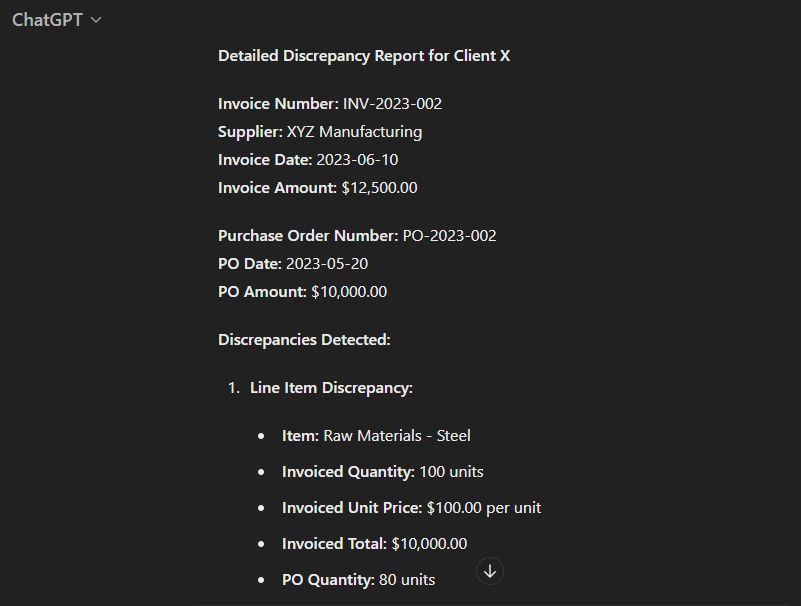
For instance, Claude AI can quickly identify discrepancies between invoiced amounts and purchase orders. When you provide the right data and context, it delivers precise analysis in seconds, minimizing human error in complex comparisons.
2. Enhance Client Experience
AI tools like Claude AI can dramatically improve how you interact with clients. They help maintain a professional, consistent tone across all communications, building trust and strengthening your firm’s brand.
During peak seasons, quick responses are crucial. Claude AI can draft immediate replies to common inquiries, ensuring clients always feel supported. It acts as a valuable assistant, helping you craft professional emails quickly.
While an AI-generated draft might need minor tweaks, it provides an excellent starting point, significantly improving your client engagement process.
3. Support Training and Continuous Learning
Staying updated with new accounting concepts, regulations, and technologies can be challenging. Claude AI offers an excellent resource for continuous learning within your firm.
It excels at explaining complex concepts clearly and provides practical examples or hypothetical scenarios for analysis. You can explore specialized topics like forensic accounting, tax planning strategies, or risk management techniques, making it an invaluable learning tool for your team.
13 Ways Your Accounting Firm Can Leverage Claude AI
Let’s dive into practical applications where Claude AI can transform your accounting practice, boosting productivity and innovation.
1. Create Engaging Blog Posts
Claude AI is an excellent assistant for content creation, but avoid relying on it completely for blog posts. Instead, use it to brainstorm ideas, develop outlines, check for grammar and spelling, and suggest SEO improvements.
To get the best results, craft detailed prompts. For example, instruct Claude AI to adopt an authoritative yet conversational tone, focusing on actionable business advice, especially in accounting and growth. This approach yields content that resonates deeply with your readers.

When you ask Claude AI to rewrite paragraphs or draft entire sections, providing specific stylistic guidance ensures a unique and engaging output, rather than generic text.

2. Draft Client Emails Efficiently
Claude AI helps firm owners compose personalized emails to clients quickly. You can create a series of prompts that include essential client information such as their first name, industry, the email’s purpose, and any specific concerns or calls to action.
A simple prompt like, ‘Write a professional yet casual email reminder to a client about an upcoming quarterly tax return deadline. Request necessary documentation as soon as possible and include a friendly closing,’ can generate a draft in seconds.

This provides a fresh draft ready for your review and minor edits, saving valuable time.
3. Convert Loom Videos into Standard Operating Procedures (SOPs)
Many firms use tools like Loom for internal communication and reducing meetings. You can take this a step further by using Claude AI to create SOPs from video transcripts.

Simply copy the transcript from a Loom video and paste it into Claude AI, asking it to summarize the content into a step-by-step SOP. This quickly formalizes processes, making training and knowledge transfer much easier.
4. Extract Data from PDFs to Excel
Manually transferring data from PDF files to Excel can be a tedious and time-consuming process. Claude AI can significantly streamline this by allowing you to copy and paste data from PDFs directly into its interface.
Then, simply ask Claude AI to format the information into a table, which you can easily insert into Excel. With advanced versions, direct file uploads further simplify this data extraction, making it a more convenient experience.
5. Classify Uncategorized Bank Transactions
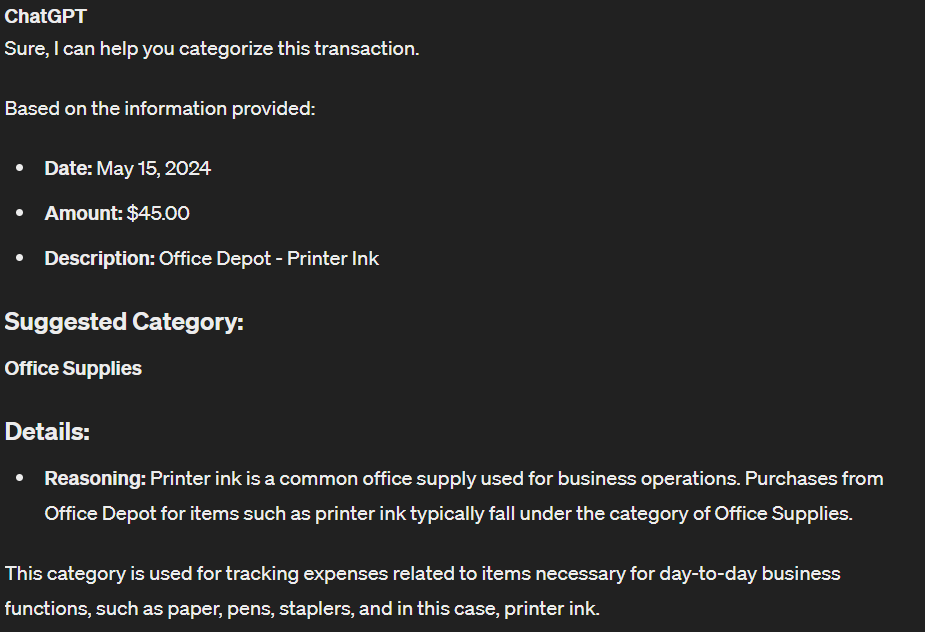
Bookkeeping can be dramatically sped up by using Claude AI to review and suggest categories for bank transactions. You just need to enter the transaction details into the chat interface.
Claude AI will provide suggestions, which you can then accept or adjust before updating your records. This process not only saves time but also significantly improves the accuracy of your financial data.
6. Create Engaging Social Media Posts
Establishing your firm’s online presence requires a constant flow of fresh, engaging social media content. With billions of people on social media, it’s a vital channel for marketing your services.

Claude AI can help you craft posts that are relevant, engaging, and tailored to your target audience. You can experiment with prompts, tones, and content until you achieve the desired impact, though some manual editing will likely be necessary.

7. Summarize Meeting Notes
Quickly getting to the core of meeting discussions is essential for productivity. Claude AI excels at summarizing meeting notes, helping you identify key decisions and action items.
First, record your meeting using a transcription-capable tool or transcribe the recording separately. Then, input the transcribed text into Claude AI with a prompt like, ‘Summarize these meeting notes, focusing on key decisions, action items, and important points discussed.’ This delivers a concise overview, saving you time.

8. Fix Excel Formula Issues
Forgot an Excel formula or struggling with its correct input? Claude AI can provide step-by-step instructions. Simply describe the calculation or task you want to perform in Excel.
Claude AI will then offer the appropriate formula and guidance on how to use it. This feature significantly speeds up financial reporting and analysis, making your workflow smoother. Explore custom GPTs for even more specialized Excel assistance, though some advanced features might require a paid plan.


9. Reduce Market Research Time
Market research can be time-consuming, but Claude AI can dramatically cut down the effort. It helps by summarizing reports and articles, answering specific questions based on provided content, generating insights from data, and recommending additional resources.
For competitor analysis, collect names, news articles, financial reports, and press releases. Provide this data to Claude AI, instructing it to summarize and answer specific questions about market positioning, strengths, and weaknesses. Advanced paid plans offer even deeper research capabilities.


10. Create Email Signatures for Easy Advertising
Your email signature is an underrated marketing tool for your accounting firm. It provides a consistent touchpoint for advertising your services subtly and effectively.

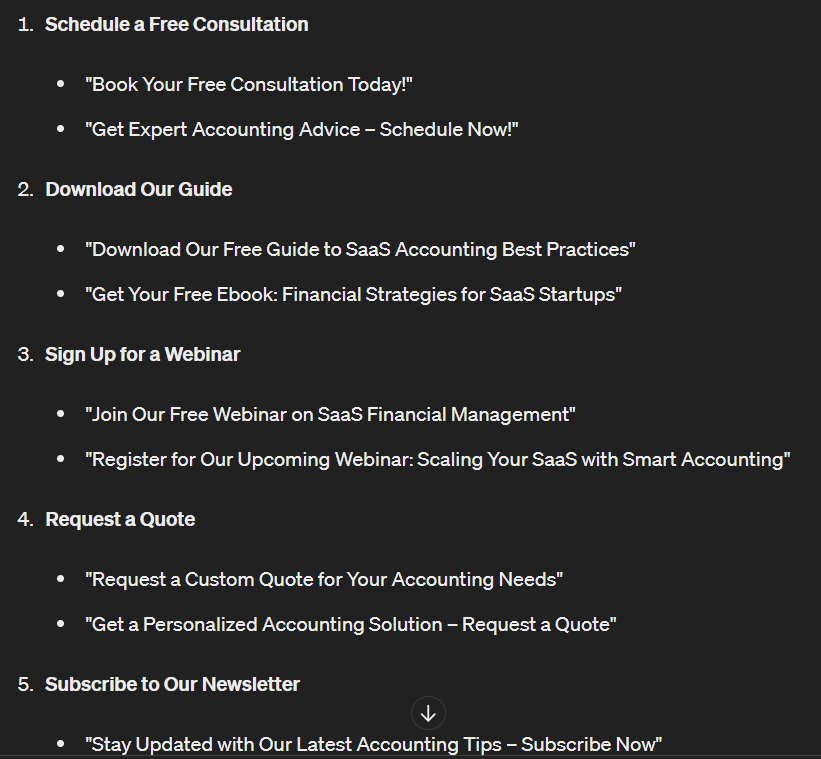
If you’re unsure what to include, Claude AI can generate a list of ideas for your email signature. For example, ask it for possible Calls to Action (CTAs) for an accounting firm targeting SaaS startups, and it will provide compelling options.
11. Develop Better Case Studies
Case studies are powerful marketing assets, showcasing the intricate details of how your services benefit clients. Claude AI can significantly aid in their creation.
Provide specific details in your prompt about your clients, the challenges they faced, and how your firm provided solutions. Claude AI will then generate a detailed draft that’s nearly ready for publication, requiring only minor tweaks for perfection.

12. Summarize Financial Information for Monthly Executive Overviews
Using Claude AI to summarize information for monthly executive summaries streamlines the process, ensuring clarity and conciseness. This is where a Checklist for Claude AI for financial statements becomes invaluable.
Checklist for Claude AI for Financial Statements:
- Data Preparation: Begin by collecting all relevant financial data and reports. This includes income statements, balance sheets, cash flow statements, key performance indicators (KPIs), budget vs. actual analyses, and any significant financial events. Always anonymize sensitive information to safeguard privacy.
- Structured Input: Clearly label each section of the financial data before inputting it into Claude AI. For instance, structure your data with headings like ‘Revenue: Current Month $X, Previous Month $Y, Year-over-Year Change Z%,’ and ‘Expenses: Current Month $A, Previous Month $B, Major Changes Details.’
- Prompt Engineering: Provide your organized data and instruct Claude AI to generate a summary. Specify the desired tone (e.g., concise, professional) and length. A good prompt might be: ‘Summarize the following financial data for a monthly executive overview, highlighting key trends, significant variances, and critical financial performance insights. Do not mention client names or sensitive proprietary data.’
- Review and Refine: Carefully review the summary generated by Claude AI for accuracy, completeness, and adherence to your firm’s reporting standards. Make any necessary adjustments to the output or refine your prompts for future use to ensure it perfectly aligns with stakeholders’ expectations.

13. Simplify Complex Tax Regulations
Tax regulations are often intricate and difficult to interpret. Claude AI can help accountants understand and apply them by providing clear summaries and explanations. You can ask for a digestible summary of specific tax sections or new regulations.
For example, a prompt like, ‘Can you summarize Section 179 of the new tax regulations regarding small business deductions in a more digestible manner?’ will yield a simplified explanation. Claude AI can also assist with tax computations, making your calculations faster and more accurate.

Understanding the Risks of Using AI in Accounting
While AI offers immense benefits, it’s crucial to be aware of the potential risks when integrating tools like Claude AI into your accounting practice. Vigilance and human oversight remain essential.

1. Potential for AI Errors
A significant risk with AI in accounting is the lack of direct human oversight. While Claude AI can process vast amounts of data and offer insights, it can also make subtle mistakes. Without a thorough manual review, these errors might go unnoticed, leading to inaccurate financial reporting or compliance issues.
2. Generating Generic Results
Claude AI, as a machine learning tool, learns from the data it’s trained on. Without sufficient, specific human input, it often produces generic content. Relying solely on AI for tasks like marketing can result in bland, unoriginal materials that fail to capture attention or convey your firm’s unique value. Custom prompts and careful editing are key to avoiding this.
3. Data Security Concerns
The use of Claude AI and other LLMs introduces security risks, especially when handling sensitive financial information. Once you input financial data into an AI system, you must be confident in the platform’s security protocols and your firm’s data governance policies. Always anonymize sensitive client data before using it with AI tools for summaries or analysis.
Frequently Asked Questions (FAQ)
Q1: Can Claude AI fully automate all accounting tasks?
No, Claude AI cannot fully automate all aspects of accounting. It’s a powerful assistant for repetitive and data-intensive tasks, but human judgment, ethical considerations, and complex strategic decisions still require professional accountants. AI enhances, not replaces, human expertise.
Q2: How accurate is Claude AI when summarizing financial statements?
Claude AI can be highly accurate when summarizing financial statements, provided you give it clear, structured data and precise prompts. However, you must always verify its output for accuracy and completeness, especially with critical financial reporting, as AI can occasionally misinterpret context or generate subtle errors.
Q3: What’s the most important tip for using Claude AI effectively in an accounting firm?
The most important tip is to focus on ‘prompt engineering’ – crafting clear, specific, and detailed instructions for Claude AI. The quality of its output directly depends on the quality of your input. Also, always maintain human oversight to review and validate AI-generated content or analysis, especially for critical tasks.
Q4: Is Claude AI secure for handling client data?
Data security is a critical concern. While Claude AI platforms have robust security measures, it’s essential for your firm to have strict internal policies. Always anonymize sensitive client information before inputting it into any AI tool. Consult your firm’s IT and compliance teams to ensure adherence to data protection regulations and best practices.
Q5: How can Claude AI help with tax compliance beyond simplification?
Beyond simplifying regulations, Claude AI can assist with tax compliance by helping you research specific clauses, calculate tax liabilities based on provided financial data, and even draft responses to common tax inquiries. It’s a supportive tool for understanding complex tax scenarios and speeding up calculations.
Keywords: Claude AI, financial statements, accounting automation, AI in finance, accounting technology, LLM in accounting, efficiency, client experience, tax compliance, data analysis