As a bookkeeper or accountant, you know the daily grind well. You juggle journal entries, clarify financial reports, craft professional emails, and consistently follow up with clients. It often feels like a constant race against the clock, leaving little room for anything else. But what if a powerful tool could help you streamline your workflow, making your tasks quicker and more efficient? That’s precisely where an AI copilot like ChatGPT steps in.
This isn’t about replacing your expertise; it’s about empowering you. Imagine having a dedicated assistant available 24/7, ready to provide instant, intelligent support whenever you need it. This innovative AI understands your queries and delivers helpful, context-aware responses to revolutionize how you manage your accounting duties.

An AI copilot like ChatGPT is an advanced artificial intelligence tool designed to comprehend natural language and generate relevant, insightful text. For bookkeepers and accountants, this translates into practical assistance with real-world tasks. Think about generating journal entries, drafting emails, summarizing lengthy reports, or answering common client inquiries. Leveraging AI can significantly reduce manual effort and free up your valuable time.
Streamlining Your Bookkeeping with AI: Practical Applications
1. Effortless Journal Entry Creation
Crafting journal entries often involves careful consideration of debits and credits. With an AI copilot, this process becomes remarkably simple. You can input a natural language request, such as, “Create a journal entry for $1,200 rent paid on May 1st from the bank,” and receive the correct entry within moments. This capability extends to various transactions, from sales and payroll to other routine entries, helping you execute tasks faster and with greater confidence.
2. Simplifying Financial Reports for Clients
Many clients find financial reports complex and overwhelming. They typically seek key insights rather than intricate details. Instead of spending considerable time explaining every line item, you can paste the report into your AI copilot and request a summary of the main points. The AI provides a concise, easy-to-understand overview, making it simpler for clients to grasp their financial standing and enhancing their trust in your services.
3. Automating Professional Email Correspondence
Writing emails, especially reminders or follow-ups, can be time-consuming. An AI copilot can draft professional emails in seconds. Just provide a brief prompt, like, “Write a reminder email for missing receipts,” and the AI generates the content for you. Whether you need a thank-you note, a deadline reminder, or a follow-up message, you will always have well-articulated communication ready to go.
4. Providing Quick Answers to Client Questions
Clients frequently ask similar questions, such as, “Why is my profit different from my bank balance?” or “Do I really need to keep every single receipt?” Instead of formulating new responses repeatedly, you can utilize your AI copilot to generate clear, concise answers. You can even save these responses as templates for future use, ensuring consistent, professional, and rapid client support.
5. Seamless Integration with Leading Accounting Software
An AI copilot proves highly beneficial when you work with platforms like QuickBooks Online or Xero Accounting. It can assist you in interpreting reports, explaining transaction details, or even summarizing overall financial activity within these systems. You don’t need to be a tech guru; simply ask your question, and the AI will offer relevant guidance, making your accounting software even more powerful.
Advanced Tips for AI Copilot for Bank Reconciliation
While an AI copilot excels at routine tasks, it also offers significant potential for more complex operations like bank reconciliation. You can leverage its analytical capabilities to identify discrepancies, suggest categorizations, and even flag unusual transactions. For instance, ask your AI, “Analyze this bank statement against my ledger and highlight any unmatched items,” or “Suggest common reasons for reconciliation differences based on typical accounting practices.”
For even more granular assistance, input specific transaction details and ask, “What is the best way to categorize this ATM withdrawal for cash expenses?” or “Explain how to resolve a payment that cleared the bank but isn’t in my books.” These advanced AI prompts can provide you with immediate insights and best practices, accelerating the reconciliation process and minimizing errors.
Unlock Your AI Potential with Accountutor
To truly master an AI copilot for accounting, understanding how to formulate effective prompts is crucial. Platforms like Accountutor offer specialized courses, such as “ChatGPT for Bookkeepers & Accountants,” that teach you step-by-step how to utilize AI for journal entries, emails, reports, and more. You gain access to ready-to-use prompts, practical examples, and beginner-friendly video tutorials, which can save you countless hours each week when integrating AI with tools like QuickBooks and Xero.
Become a Highly Sought-After Bookkeeper
Today’s accounting professionals who embrace smart tools like AI copilots stand out in the industry. They complete tasks more rapidly, serve clients more effectively, and create more opportunities for professional growth. Embracing AI is a strategic move for career advancement, allowing you to save time, reduce stress, and deliver superior service.
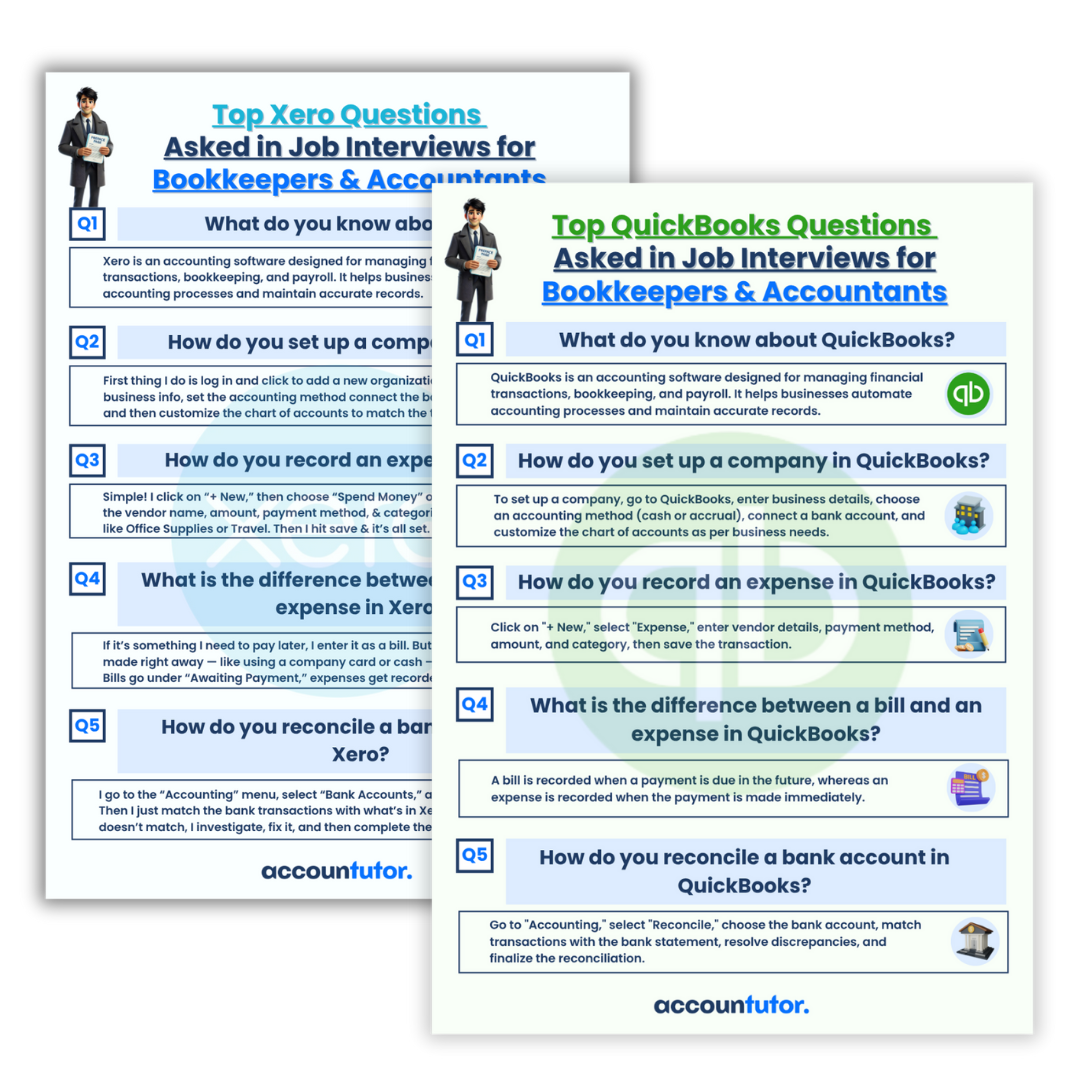
For those preparing for career steps, resources like practical interview questions for QuickBooks and Xero Accounting can be invaluable. These PDFs cover real-world tasks, including recording expenses, reconciling accounts, and setting up company files, helping you confidently showcase your skills to potential employers.

Download QuickBooks Interview Questions: [Link to Download]
Download Xero Interview Questions: [Link to Download]
Why Choose Accountutor for Your Accounting Education?
If you’re ready to make your accounting work smarter and easier, Accountutor.com offers the “ChatGPT for Bookkeepers and Accountants” course tailored specifically for you. Explore additional practical courses on QuickBooks Online, Xero Accounting, and Bookkeeping Basics to further enhance your skills. Start today and position yourself as a forward-thinking bookkeeper prepared for the future.
Frequently Asked Questions (FAQs)
Q1: Can an AI copilot like ChatGPT replace a human bookkeeper?
No, an AI copilot is a tool designed to assist human bookkeepers, not replace them. It automates repetitive tasks, provides quick insights, and helps streamline processes, allowing bookkeepers to focus on more strategic and analytical work.
Q2: How can an AI copilot help with bank reconciliation?
An AI copilot can offer advanced tips for bank reconciliation by helping you identify discrepancies, suggest transaction categorizations, and flag unusual entries. You can prompt it to compare statements with ledgers, explain differences, or recommend solutions for unmatched items.
Q3: Is it difficult to learn how to use an AI copilot for accounting tasks?
Not at all! While there’s a learning curve to formulating effective prompts, courses like those offered by Accountutor provide step-by-step guidance, practical examples, and video tutorials that make learning accessible for beginners.
Q4: Can an AI copilot integrate with my existing accounting software?
While an AI copilot like ChatGPT doesn’t directly integrate into software like QuickBooks or Xero in the traditional sense, you can easily use it alongside these tools. You can copy-paste data or descriptions into the AI for analysis, summaries, or explanations, enhancing your work within your preferred accounting platforms.
Q5: What kind of emails can an AI copilot help me write for clients?
An AI copilot can help you draft a wide range of professional emails, including reminders for missing documents, follow-ups on invoices, thank-you notes, responses to common client questions, and deadline notifications, all with minimal effort.

Keywords: AI bookkeeping, ChatGPT for accountants, bank reconciliation tips, AI copilot finance, accounting automation, journal entry AI, financial report summarization, email automation accounting, QuickBooks AI, Xero AI