Many small business owners face common financial questions daily. “Who still owes me money?” “Where are my biggest expenses?” “How healthy is my cash flow?” Traditionally, finding these answers meant diving deep into accounting software, sifting through reports, and navigating various pages.
However, the Akaunting x ChatGPT app changes this process entirely. It seamlessly connects your Akaunting account with ChatGPT, transforming how you interact with your financial data. Now, you can simply ask questions and receive instant insights through natural conversation.


Essentially, this powerful tool acts as your personal AI accounting assistant. It empowers you to leverage ChatGPT for interacting directly with your Akaunting data, making complex financial tasks simpler. You can quickly request accounting records, review business activities, and even create new expenses.
This app proves incredibly useful for anyone seeking faster access to their financial information. It’s designed for small business owners, freelancers, founders, consultants, bookkeepers, and accountants. Service businesses and online ventures managing income, expenses, invoices, and cash flow will find it particularly helpful.
The Akaunting x ChatGPT app lets you perform numerous common accounting actions just by chatting. You can effortlessly list invoices, customers, vendors, bills, transactions, and items. Moreover, you can create expenses and visualize financial trends with insightful charts. These capabilities highlight the power of effective ChatGPT prompt templates for finance.
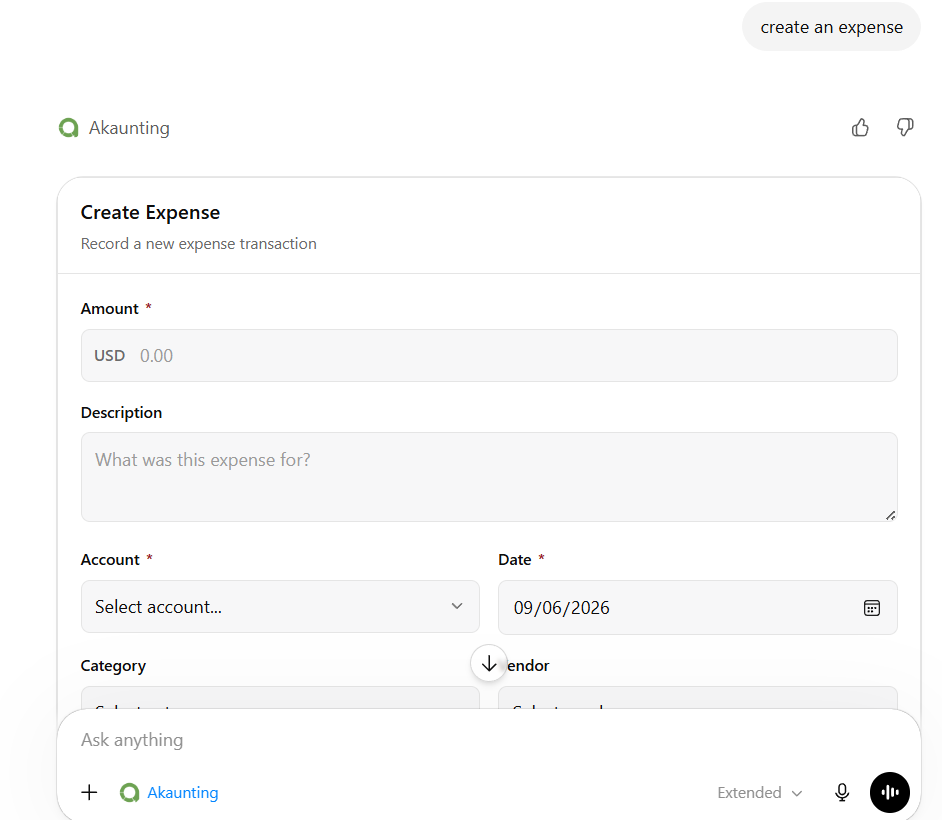
One of the most valuable features is the ability to create expenses directly within ChatGPT. You can provide all necessary details like amount, date, description, vendor, category, and account. For instance, a simple prompt like, “Create an expense for office supplies,” allows you to quickly record business costs and avoid missing crucial entries.
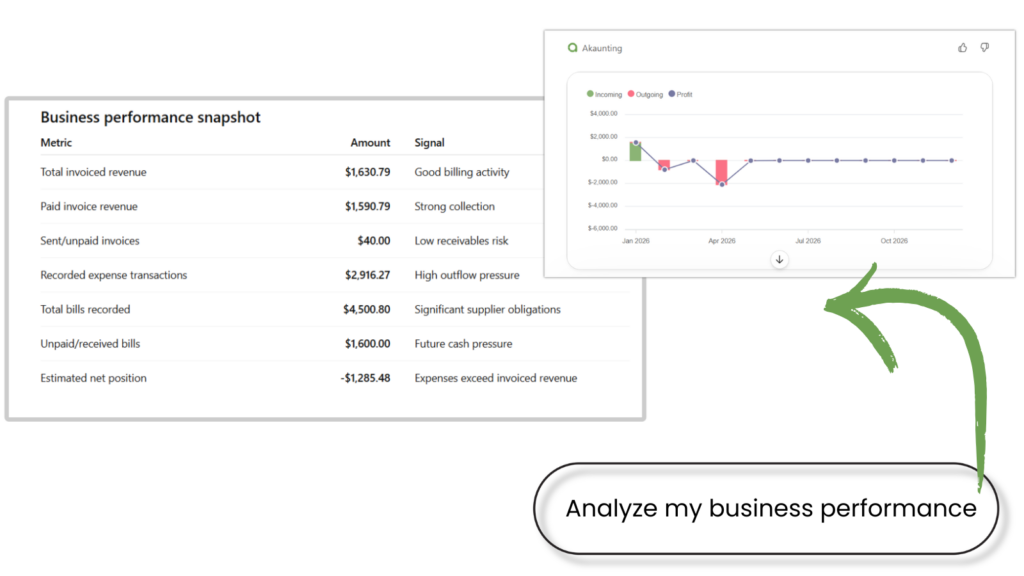
Wondering where your business spends the most? Just ask ChatGPT to analyze your Akaunting data and summarize performance across various aspects. You can gain insights into invoices, bills, transactions, cash flow, profit and loss, and even expenses categorized by type. Try using ChatGPT prompt templates for finance like, “Where is my business spending the most money?” to uncover key trends.
Reviewing your billing activity has never been easier. Simply ask ChatGPT to “List my invoices” from your Akaunting account. This command provides a quick overview of customer charges and recorded sales, eliminating the need to manually search through pages of records. It’s perfect for checking recent sales or reviewing outstanding bills.
Small businesses allocate funds across diverse areas, from software subscriptions to rent, travel, and marketing. With the Akaunting x ChatGPT app, you can visualize these spending patterns. A prompt such as, “Show my expenses by category chart,” instantly reveals where your money goes, helping you identify areas for optimization.
More Powerful ChatGPT Prompt Templates for Finance:
- List transactions: Understand how money flows through your business.
- View cash flow: Track money entering and leaving your business over time.
- List customers: Quickly access customer records saved in Akaunting.
- List vendors: Check supplier information and see who your business purchases from.
- List bills: Review your supplier costs and business obligations efficiently.
- List items: Access details about your products or services, including prices and categories.
- View profit and loss: Generate a chart to understand your business’s overall profitability.
Absolutely not. Think of the ChatGPT app as an intelligent, conversational layer over your existing Akaunting software. Akaunting remains your robust accounting platform, while ChatGPT provides a faster, more intuitive way to access supported data, ask questions, and perform actions without navigating multiple screens.
The Akaunting x ChatGPT app offers an unparalleled way to streamline your daily accounting tasks. By integrating these two powerful tools, you gain faster access to critical financial information, create records with ease, and visualize complex data through simple conversation. It’s time to leverage the power of ChatGPT prompt templates for finance to get closer to your business data than ever before.
Frequently Asked Questions (FAQ):
Q: What exactly is the Akaunting x ChatGPT app?
A: The Akaunting x ChatGPT app links your Akaunting account with ChatGPT. This integration allows you to access your accounting records, create expenses, and view financial charts simply by having a conversation.
Q: What can I accomplish with the Akaunting x ChatGPT app?
A: You can list various financial records like invoices, customers, vendors, bills, transactions, and items. Furthermore, you can create expenses and visualize data through cash flow, profit and loss, and expense-by-category charts.
Q: Is this app beneficial for small businesses?
A: Yes, absolutely. It significantly helps small businesses by providing quick access to accounting information and insights into business activity, eliminating the need for manual searching across multiple pages.
Q: Can I create new expenses using ChatGPT?
A: Yes, you can. Simply provide the necessary details, such as the amount, date, description, vendor, category, account, currency, and transaction number, directly within your chat with ChatGPT.
Q: Am I able to view financial reports through ChatGPT?
A: Yes. You can ask ChatGPT to display your cash flow chart, profit and loss chart, and expenses by category chart, all powered by your Akaunting data.
Q: Does ChatGPT take the place of Akaunting?
A: No, ChatGPT does not replace Akaunting. Akaunting continues to be your primary accounting software. The ChatGPT app serves as a conversational interface, making it easier to access supported accounting records and insights.
Q: Do I need an Akaunting account to use this app?
A: Yes, you must have an active Akaunting account to connect your financial data with ChatGPT and utilize the app’s features.
Keywords: ChatGPT, AI accounting, finance prompts, small business finance, Akaunting, financial management, expense tracking, cash flow, profit and loss, accounting software