Unlocking Efficiency: Best Practices for Claude AI in Accounting
Artificial intelligence (AI) has become an indispensable tool in the accounting profession. Many firms now rely on AI for ensuring compliance, automating repetitive tasks, and even handling complex data analysis and personalized client communications. This article will explore various ways AI, including large language models like Claude AI, can boost your firm’s efficiency and improve overall operations.
We will also dive into specific best practices for leveraging Claude AI, particularly for critical processes like bank reconciliation.
What Exactly is AI in Accounting?
At its core, AI in accounting involves using intelligent systems to perform tasks that typically require human intelligence. Large language models (LLMs) like Claude AI and ChatGPT are powerful examples, interacting through conversational interfaces. These tools can automate manual and repetitive tasks, making them invaluable for modern accounting practices.
You can use them for generating text, summarizing documents, personalizing client responses, assisting with research, proofreading, and even brainstorming ideas. Think of them as intelligent assistants ready to streamline your workflow.
How AI Transforms Accounting Firms
Integrating AI brings several significant benefits to accounting firms. It allows teams to focus on higher-value work by automating mundane tasks and enhancing client interactions.

1. Reducing Manual Workloads
AI excels at handling tedious tasks. This includes writing email replies, analyzing journal entries, crafting blog posts, and preparing financial reports. By automating these, your team gains more time for strategic, high-level work.
For instance, an AI tool can quickly check discrepancies between invoiced amounts and purchase orders. When you provide the right data and context, AI delivers precise results rapidly.

AI can analyze financial data in mere seconds, simplifying what would otherwise be a meticulous and error-prone manual task. The right prompt makes this process straightforward and efficient.
2. Enhancing Client Experience
AI significantly boosts client satisfaction through professionalism and quicker responses. Consistent, professional communications build trust and demonstrate your firm’s dedication.
During busy seasons, AI can provide instant responses, ensuring clients feel supported and valued. It can even draft personalized emails, saving valuable time for your team.
While AI may not always provide the exact response you envision, it offers a solid starting point for improving customer interactions. It allows for quick, professional engagement.
3. Aiding Training and Continuous Learning
Staying updated with new concepts, regulations, and technologies in accounting can be challenging. AI tools offer excellent support for continuous learning.
They can provide clear explanations, generate hypothetical scenarios for analysis, and offer insights into specialized topics like forensic accounting or tax planning strategies. This makes complex information more accessible.
Practical Applications of AI in Accounting Firms
Let’s explore specific ways your accounting firm can leverage AI for various tasks, from content creation to financial analysis.
1. Generating Blog Posts
AI can assist in creating informative blog posts for your accounting firm. While it shouldn’t be your sole content creator, it’s excellent for brainstorming ideas, generating outlines, checking grammar, and suggesting SEO improvements.
Using specific prompts ensures the generated content matches your desired tone and style. This prevents generic outputs and helps you connect better with your audience.


A distinctive writing style resonates more effectively with readers than generic content. AI helps you achieve this by refining drafts based on your specific instructions.
2. Drafting Client Emails
AI can help firm owners draft personalized emails to clients quickly. You can create prompts that include client details, industry, email purpose, and specific calls to action.
This allows for professional yet casual reminders about deadlines or requests for documentation. You get a fresh draft in seconds, ready for minor edits.

3. Converting Video to SOPs
Many firms use tools like Loom for video communication, which often includes transcriptions. You can copy a video transcript into an AI tool and ask it to summarize it into a step-by-step Standard Operating Procedure (SOP).
This method streamlines the creation of training materials and process documentation. It transforms spoken instructions into clear, actionable steps efficiently.
4. Transforming PDFs into Excel Data
Manually extracting data from PDFs for Excel can be incredibly time-consuming. AI streamlines this by allowing you to copy and paste PDF data and request it to format the information into a table.
Newer AI models, like GPT-4, even allow direct file uploads for a more convenient experience. This drastically reduces manual effort and potential errors.
5. Best Practices for Claude AI for Bank Reconciliation
One of the most powerful applications for an AI like Claude AI is categorizing uncategorized bank transactions. Claude AI can review transactions and suggest categories, significantly speeding up bookkeeping.
To leverage Claude AI for bank reconciliation, follow these best practices:
- **Provide Clear Context:** Input raw transaction data directly into Claude AI. Include dates, amounts, and detailed descriptions for each transaction.
- **Specify Categorization Rules:** Explicitly tell Claude AI what categories you typically use (e.g., ‘Office Supplies,’ ‘Utilities,’ ‘Travel Expenses’). You can even provide examples of transactions that fit each category.
- **Iterate and Refine:** If Claude AI’s initial suggestions aren’t perfect, provide feedback. For example, ‘No, ‘Office Depot’ should be ‘Office Supplies,’ not ‘General Expenses.” Claude AI learns from these corrections.
- **Batch Processing (with Caution):** For large datasets, process transactions in manageable batches. This helps maintain accuracy and allows for easier review of Claude AI’s suggestions.
- **Human Oversight is Key:** Always review Claude AI’s suggested categorizations before updating your records. While highly accurate, AI should complement, not replace, human judgment in critical financial tasks.
By following these best practices, you can dramatically improve the accuracy and speed of your bank reconciliation process with Claude AI.
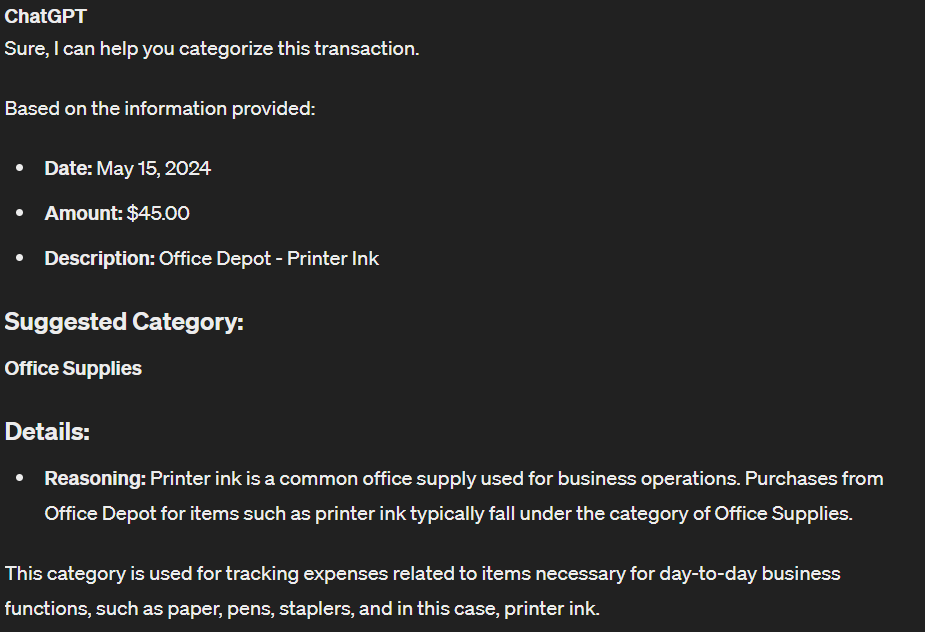
This saves valuable time and improves overall accuracy in your financial records.
6. Creating Social Media Content
Building an online presence requires consistent, engaging social media content. With billions of people on social media, it’s crucial for your firm to be visible.

AI can generate relevant and engaging social media posts tailored to your target audience. You can tweak prompts, tone, and other aspects to achieve the best results.
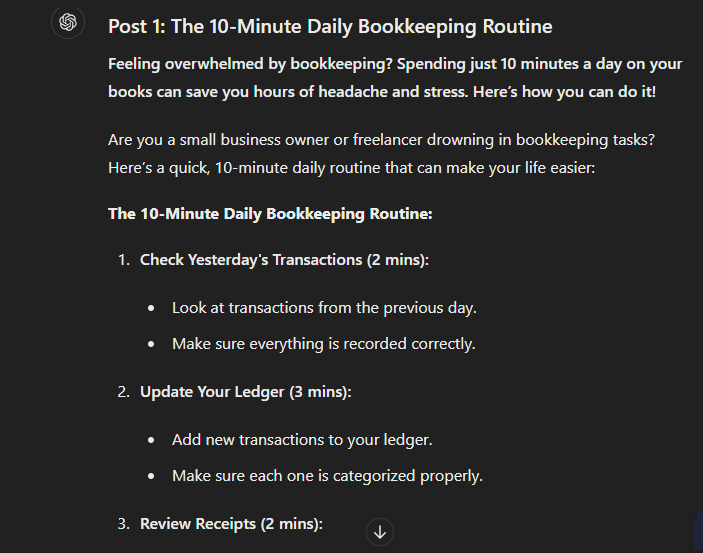
While some editing might still be necessary, AI provides a strong foundation for your firm’s social media strategy.
7. Summarizing Meeting Notes
AI is excellent for condensing lengthy meeting notes into concise summaries. Start by recording your meetings using a transcription-capable tool like Loom.
Once you have the transcription, input it into AI with a prompt like, ‘Summarize these meeting notes, focusing on key decisions, action items, and important points discussed.’ This instantly provides a clear overview.

8. Resolving Excel Formula Issues
If you’re stuck on an Excel formula, AI can provide step-by-step instructions. Simply describe the task or calculation you need to perform, and AI will offer the appropriate formula.
This speeds up financial reporting and makes complex calculations more accessible. You can even explore custom AI tools designed specifically for Excel assistance.

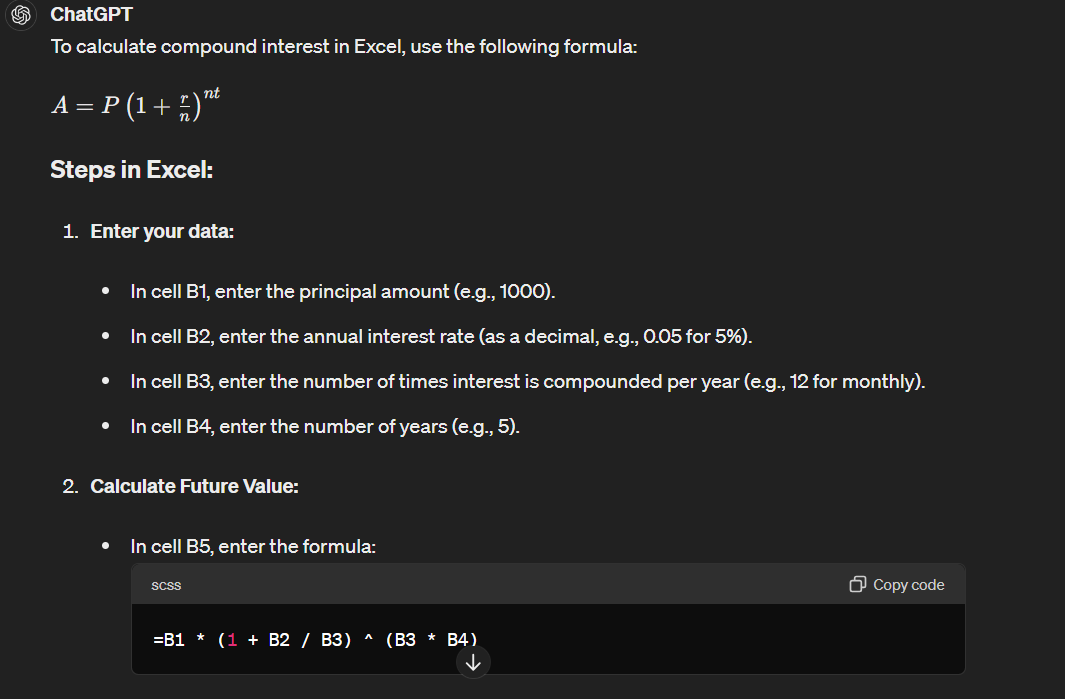
9. Reducing Market Research Time
AI can significantly cut down market research time by summarizing reports, answering questions, generating insights, and recommending resources. It’s a powerful tool for competitor analysis.
You can gather competitor data, provide it to AI, and instruct it to summarize. Then, ask targeted questions to gain deeper insights into their strategies and performance.

Advanced paid AI plans often offer deep research models, further enhancing your research capabilities.

10. Crafting Email Signatures for Advertising
An email signature is an underrated marketing tool for accounting firms. AI can generate a list of ideas for compelling email signatures, including effective Calls to Action (CTAs).
For example, you can ask for CTAs targeting SaaS startups. AI provides options, allowing you to choose the most impactful one for your firm.


11. Developing Better Case Studies
Case studies are highly effective marketing tools, detailing how your services benefit clients. AI can assist in creating these by taking specific details about client challenges and your solutions.
You provide the key information, and AI drafts a compelling narrative. While some refinement may be needed, it gives you a strong, almost-ready foundation.
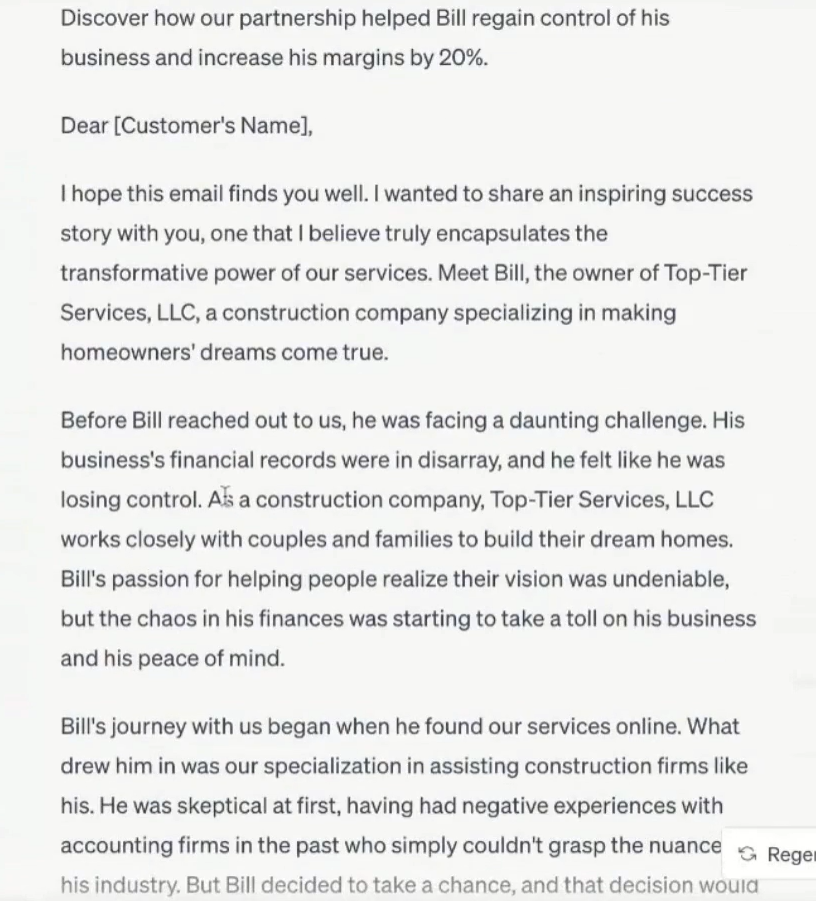
12. Summarizing for Monthly Executive Summaries
Using AI to summarize information for monthly executive summaries streamlines the process, ensuring clarity and conciseness. Always anonymize sensitive information to protect privacy.
Gather all relevant financial statements, KPIs, and reports. Prepare your input by clearly labeling sections, then ask AI to generate the summary, specifying tone and length. Review carefully for accuracy.

13. Simplifying Tax Regulations
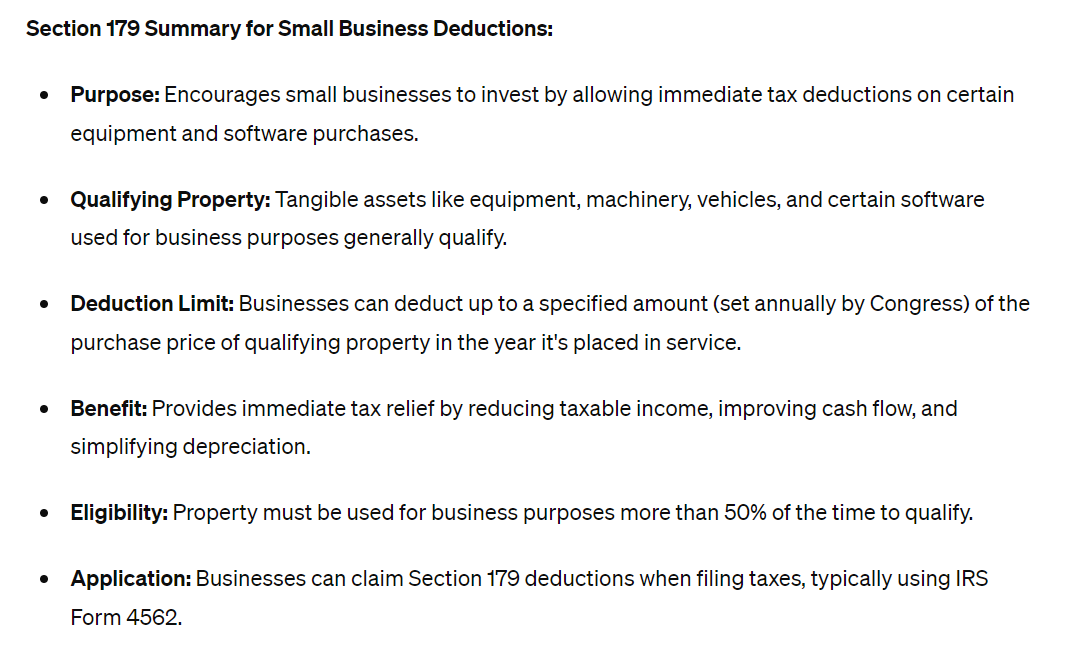
AI can interpret complex tax regulations and provide simplified summaries. This makes it easier for accountants to understand and apply them correctly.
You can ask AI to summarize specific sections of new tax regulations in an easily digestible manner. It can also assist with tax liability computations by taking your financial details and applying the relevant rates.
Potential Risks of Using AI in Accounting
While AI offers immense benefits, it’s essential to be aware of potential risks.

AI Errors
A major risk is the potential for AI errors due to lack of human oversight. AI can process vast amounts of data but may make mistakes that go unnoticed without manual review. Always maintain a human review process for critical outputs.
Generic Results
AI, being a machine learning tool, can produce generic content without sufficient human input. Relying solely on AI for marketing or communication efforts can lead to bland, unengaging content. Tailor your prompts carefully to achieve unique results.
Data Security Concerns
Security risks are associated with AI models, especially when sensitive financial data is involved. Be cautious about the type of information you input into public AI systems. Always anonymize data where possible and use secure, enterprise-grade AI solutions when handling confidential client information.
Frequently Asked Questions About AI in Accounting
Q1: Can AI fully automate all accounting tasks?
No, AI cannot fully automate all accounting tasks. It excels at repetitive, data-intensive processes, but human judgment, strategic thinking, and client relationship management remain crucial. AI is a powerful assistant, not a complete replacement.
Q2: How accurate are AI tools like Claude AI for financial tasks?
AI tools like Claude AI are highly accurate, especially with well-defined prompts and sufficient context. However, they are not infallible. Always implement human oversight and verification for critical financial data and analyses to ensure accuracy.
Q3: Is my client’s data safe when using AI in accounting?
Data security is a significant concern. When using AI, especially public models, be extremely careful not to input sensitive client data. Opt for enterprise-level AI solutions with robust data protection policies and always anonymize information when possible to safeguard privacy.
Q4: How can I ensure unique content when using AI for writing tasks?
To ensure unique content, provide AI with detailed and specific prompts. Include your desired tone, style, target audience, and any unique insights or anecdotes. Always edit and personalize the AI-generated output to match your brand’s voice and avoid generic results.
Q5: What are the best practices for Claude AI for bank reconciliation?
For Claude AI in bank reconciliation, provide clear transaction data and specific categorization rules. Iterate and refine its suggestions with feedback, and use human oversight to verify all categorizations. While AI speeds up the process, final human review is essential for accuracy.
Keywords: Claude AI, bank reconciliation, accounting AI, AI in finance, accounting automation, ChatGPT for accounting, financial technology, bookkeeping AI, AI best practices, accounting efficiency