Artificial intelligence (AI) is rapidly transforming various industries, and the accounting profession is no exception. Modern accounting firms are leveraging AI tools to enhance efficiency, accuracy, and client satisfaction. Among these powerful tools, large language models (LLMs) like Claude AI stand out for their versatility.
This guide explores numerous ways accounting firms can integrate Claude AI into their daily operations. We’ll delve into how this advanced AI can streamline tasks, improve communication, and even assist with complex financial analysis, including answering the crucial question of how to use Claude AI for journal entries effectively.
What Exactly is Claude AI?
Claude AI, developed by Anthropic, represents a new generation of large language models designed for helpful, harmless, and honest interactions. You can communicate with Claude AI through a chat interface, using natural, conversational prompts to achieve a wide array of tasks. It moves beyond rigid command lists, offering a flexible and intuitive way to automate and assist with many professional duties.
Think of Claude AI as a versatile digital assistant capable of:
- Generating various forms of text, from emails to reports.
- Summarizing lengthy documents, helping you quickly grasp key information.
- Personalizing responses to client inquiries and concerns.
- Assisting with research, such as staying updated on regulatory changes.
- Proofreading and suggesting improvements for written content.
- Brainstorming ideas for marketing, business strategies, and industry trends.
How Claude AI Can Benefit Your Accounting Practice
Integrating Claude AI into your accounting firm offers several significant advantages:
1. Reducing Manual Workloads
Claude AI can significantly reduce the time you spend on repetitive, manual tasks. Imagine it assisting with drafting email replies, analyzing basic journal entries, or even helping prepare initial financial report drafts. By automating these tedious processes, your team gains more time for high-value strategic work.
For instance, Claude AI can help identify discrepancies between invoiced amounts and purchase orders. By providing it with the necessary data and context, you can prompt it to analyze these figures and flag inconsistencies, vastly improving accuracy and speeding up reconciliation processes.

This capability means Claude AI can analyze financial data in seconds, transforming what was once a time-consuming and error-prone task into a quick, efficient process with the right prompts.
2. Enhancing Client Experience
A superior client experience is vital for any successful accounting firm. Claude AI contributes significantly here by ensuring professionalism and promptness in your communications. It helps maintain a consistent, professional tone across all client interactions, strengthening your firm’s brand.
During busy seasons, when time is precious, Claude AI can generate rapid responses to common client inquiries. This ensures clients receive timely information, improving their satisfaction and trust in your services. The ability to draft personalized emails quickly is invaluable.
While AI might not always perfectly capture your preferred nuance, it provides an excellent starting point for client communication, allowing you to refine rather than create from scratch.
3. Supporting Training and Continuous Learning
The accounting industry constantly evolves with new regulations, technologies, and complex concepts. Staying current can be challenging for professionals. Fortunately, Claude AI can serve as a powerful educational tool for your team, fostering continuous learning.
Claude AI excels at simplifying complex accounting concepts, providing clear explanations and practical examples to enhance understanding. It can generate hypothetical scenarios or case studies, offering valuable opportunities for analysis and interpretation. Furthermore, you can explore niche topics like forensic accounting, advanced tax planning, or risk management techniques, gaining insights that bolster your team’s expertise.

Practical Applications: How Accounting Firms Use Claude AI
Now, let’s explore specific ways you can leverage Claude AI in your accounting practice to drive efficiency and innovation.
1. Generating Blog Content
Crafting informative blog posts about accounting topics can boost your firm’s online presence. Claude AI can be a valuable assistant in this process, though you shouldn’t rely on it for the entire creation. Use it to brainstorm fresh article ideas, create detailed outlines, and perform grammar and spelling checks.
It can also offer SEO suggestions to improve visibility. Remember to provide Claude AI with specific prompts to ensure the generated content aligns with your firm’s unique voice and avoids generic output. A well-crafted prompt ensures more distinctive and engaging results that resonate with your target audience.


2. Drafting Client Emails
Firm owners can significantly streamline client communication by using Claude AI to draft personalized emails. You can create a series of prompts that include essential client information, such as their name, industry, and the email’s purpose. Add specific concerns or calls to action to tailor the message further.
A simple prompt like, “Draft a professional yet casual email reminder to a client about an upcoming quarterly tax return deadline, requesting necessary documentation,” can quickly generate a draft. This allows you to review and edit a polished message in seconds, saving valuable time.

3. Converting Videos into Standard Operating Procedures (SOPs)
Many firms use video tools like Loom to record processes, but converting these into written SOPs can be laborious. Claude AI offers an ingenious solution: simply copy and paste the video transcript into Claude AI and instruct it to summarize the content into a step-by-step standard operating procedure.
This method transforms verbal instructions into clear, actionable written guidelines, significantly reducing the time and effort needed to document internal processes. It’s a fantastic way to ensure consistent training and operational efficiency.
4. Extracting Data from PDF Files to Excel
Manually extracting data from PDFs for Excel can be a tedious and error-prone process. Claude AI, especially its more advanced versions, can streamline this task. While direct file uploads are increasingly common in LLMs, you can often copy and paste data from PDFs into Claude AI.
Once the data is in Claude AI, simply ask it to format the information into a table. This prepared table is then ready for easy insertion into Excel, eliminating significant manual effort and improving data accuracy.
5. Classifying Uncategorized Bank Transactions and Journal Entries
Here’s where Claude AI truly shines for core bookkeeping tasks. You can quickly speed up bookkeeping by having Claude AI review uncategorized transactions and suggest appropriate categories. Just input the transaction details into the chat interface.
For example, you can provide details like “Date: May 15 2024, Amount: $45.00, Description: Office Depot – Printer Ink” and ask Claude AI for a classification. It will offer a relevant category, which you can then accept or adjust before updating your records. This drastically reduces manual categorization time and boosts accuracy.
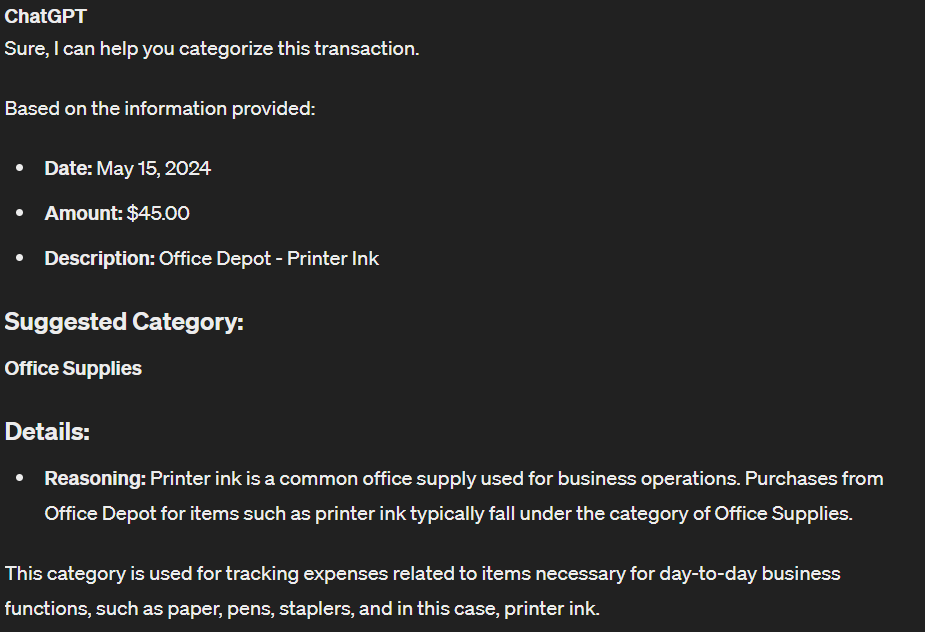
This brings us to the key question: How to use Claude AI for journal entries? Claude AI can assist by analyzing raw transaction data (like bank statements or invoices), identifying debits and credits, and even suggesting the correct accounts for each entry. You can provide a list of transactions or a summary of an event, and Claude AI can help draft the corresponding journal entry, ensuring it follows accounting principles. While human review remains essential, Claude AI provides a powerful first pass, significantly accelerating the journal entry process.
6. Creating Engaging Social Media Posts
Building an online presence through social media requires a constant flow of engaging content. With billions of people on social media, establishing your firm’s digital footprint is crucial. Claude AI can help you craft social media posts that are relevant, engaging, and perfectly tailored to your target audience.
By providing Claude AI with a topic and desired tone, it can generate compelling captions, hashtags, and even calls to action. You can refine the prompts to achieve the best results, though a final human edit will always ensure the content truly reflects your brand’s voice.


7. Summarizing Meeting Notes
Transforming lengthy meeting transcripts into concise summaries is another area where Claude AI excels. If you use a tool with transcription capabilities, record your meetings and then input the transcribed text into Claude AI. You can then use a prompt like, “Summarize these meeting notes, highlighting key decisions, action items, and important discussion points.”
This process quickly distills critical information, ensuring everyone stays informed without sifting through pages of text. It saves time and helps maintain focus on actionable outcomes.

8. Resolving Excel Formula Issues
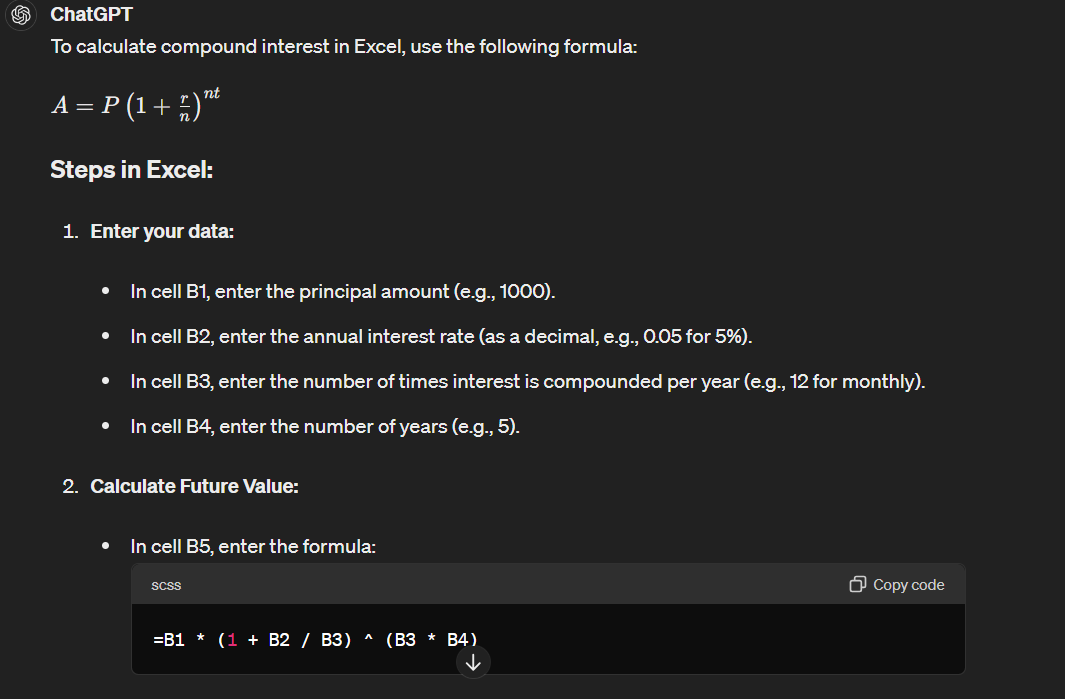
Even seasoned accountants can sometimes forget specific Excel formulas or struggle with complex calculations. Claude AI can come to your rescue by providing step-by-step instructions and the correct formulas. Simply describe the task or calculation you need to perform, and Claude AI will offer the appropriate solution.
For example, if you need to calculate compound interest but can’t recall the formula, Claude AI will provide it, along with guidance on how to input it correctly. This feature significantly speeds up financial reporting and reduces frustration.

9. Reducing Market Research Time
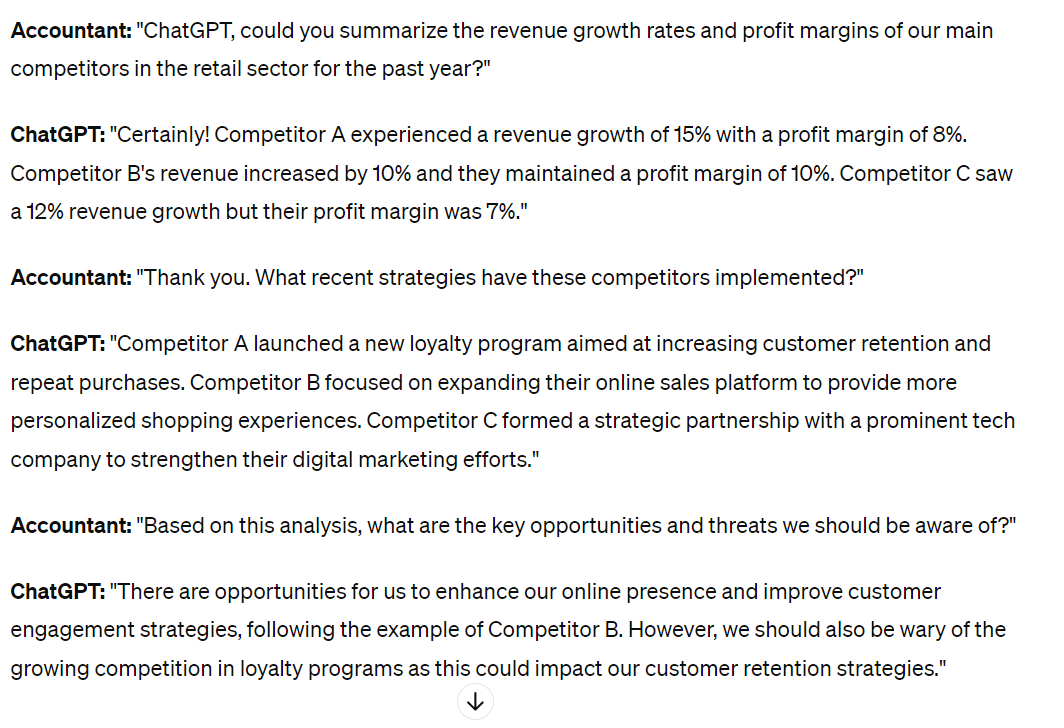
Market research can be time-intensive, but Claude AI can drastically cut down the hours you spend. It can summarize extensive reports and articles, answer specific questions about provided content, generate valuable insights from data, and even recommend additional resources. This capability makes competitor analysis much more efficient.
You can collect competitor data like news articles and financial reports, then instruct Claude AI to summarize them. Afterward, ask targeted questions to gain deeper insights into their strategies and performance, accelerating your strategic planning.

10. Crafting Email Signatures for Advertising
Your email signature is an often-overlooked marketing tool. It offers a subtle yet effective way to advertise your accounting firm. If you’re unsure what to include, Claude AI can generate a list of creative ideas for your email signature.
For example, you can ask, “Provide a list of possible email Calls-to-Action (CTAs) for an accounting firm targeting SaaS startups.” Claude AI will deliver various compelling options, allowing you to choose the most impactful one for your marketing efforts.


11. Developing Stronger Case Studies
Case studies are highly effective marketing tools because they provide detailed evidence of how your services benefit clients. Claude AI can significantly assist in creating these impactful narratives. Simply provide specific details in your prompt about your clients, the challenges they faced, and how your firm delivered solutions.
Claude AI can then draft compelling case study content, outlining the problem, your approach, and the positive outcomes. While you’ll always want to review and tweak the output for perfection, it offers an excellent foundation, saving considerable time in content creation.

12. Summarizing Information for Executive Overviews
Streamlining the creation of monthly executive summaries is crucial for clear communication. Claude AI can help condense vast amounts of information into concise, readable overviews. Remember to anonymize sensitive data before inputting it to safeguard privacy.
First, gather all relevant reports, financial statements, and key performance indicators. Then, prepare your input by clearly labeling each section for context. Provide this organized data to Claude AI with prompts specifying the desired tone and length, ensuring you omit client names or sensitive details for security.

Always review the generated summary carefully for accuracy and completeness, making any necessary adjustments to ensure it meets your expectations and the recipients’ needs.
13. Simplifying Complex Tax Regulations
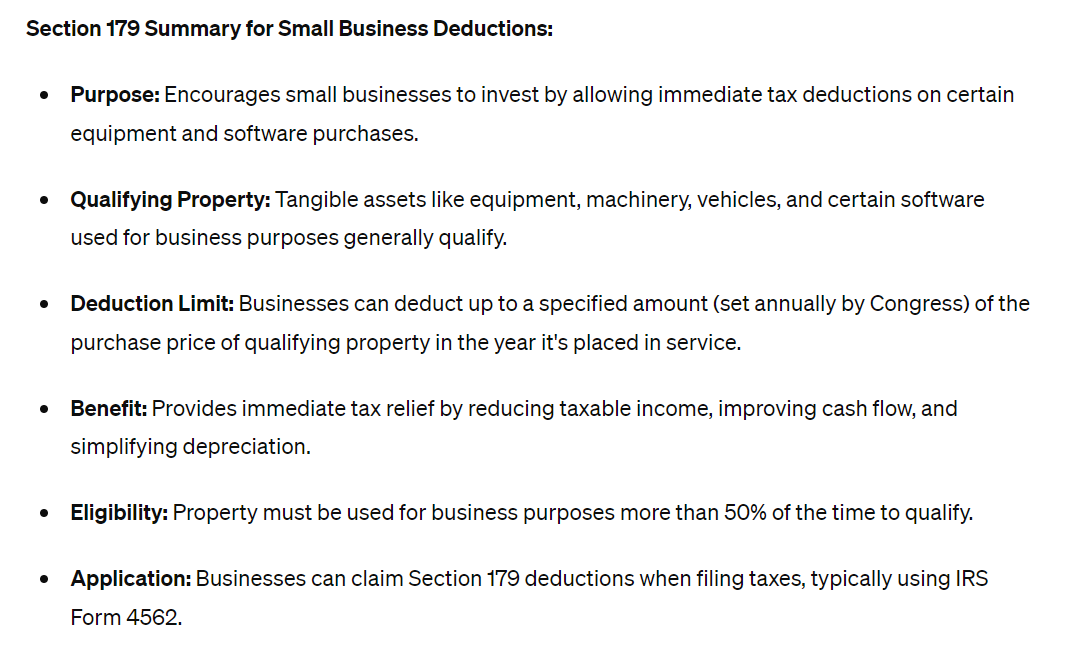
Tax regulations are notoriously complex and constantly changing. Claude AI can act as your personal interpreter, helping to simplify these regulations and provide digestible summaries. This makes it easier for accountants to understand and correctly apply intricate tax laws.
For example, you could ask, “Can you summarize Section 179 of the new tax regulations regarding small business deductions in a more understandable way?” Claude AI will deliver a clear explanation. It can also assist with computations, calculating tax liabilities based on provided financial details, further streamlining your tax preparation process.
Potential Risks When Using AI in Accounting
While AI offers incredible benefits, accounting firms must approach its integration with caution. Understanding the potential risks is crucial for responsible adoption.

1. The Possibility of AI Errors
A significant risk lies in AI’s potential for errors, especially without human oversight. While Claude AI can process vast amounts of data quickly, it might occasionally generate incorrect information or misinterpret nuanced data. Relying solely on AI without manual review could lead to costly mistakes and compliance issues.
Always implement a robust review process to catch any AI-generated inaccuracies. Human expertise remains indispensable for critical financial tasks.
2. Producing Generic Results
Claude AI, as a machine learning tool, learns from patterns in data. Without sufficiently specific and creative human input, it tends to produce generic content. Over-reliance on AI for tasks like marketing can result in bland, unoriginal material that fails to capture your audience’s attention.
To avoid this, craft detailed and unique prompts. Use Claude AI as a powerful assistant to kickstart ideas and drafts, but always infuse your firm’s distinct voice and expertise into the final output.
3. Data Security Concerns
Handling sensitive financial data with any AI model introduces security risks. Once you enter client information or proprietary data into an AI system, you must consider its privacy and security protocols. Ensure that any AI tools you use comply with relevant data protection regulations and your firm’s confidentiality policies.
Always anonymize sensitive information wherever possible and verify the data handling practices of your chosen AI provider. Prioritizing data security protects both your firm and your clients.
Frequently Asked Questions About Claude AI in Accounting
Q1: Can Claude AI completely automate all accounting tasks?
A: No, Claude AI cannot completely automate all accounting tasks. It serves as a powerful assistant that streamlines repetitive processes, generates content, and helps with data analysis. Human judgment, ethical considerations, and complex decision-making remain essential in the accounting profession.
Q2: How accurate is Claude AI for financial data analysis?
A: Claude AI can be highly accurate for data analysis when provided with clear, well-structured prompts and reliable input data. However, it’s crucial to always review its outputs, especially for critical financial reports and journal entries, to ensure accuracy and compliance with accounting standards.
Q3: Is Claude AI secure for handling sensitive client information?
A: Data security is a significant concern with any AI tool. While Anthropic, Claude AI’s developer, implements security measures, you should never input highly sensitive, unanonymized client data directly into a public AI model. Always anonymize information and ensure your firm’s data handling practices align with the AI tool’s security and privacy policies.
Q4: What’s the best way to get specific results from Claude AI?
A: To achieve specific results, you need to provide clear, detailed, and well-structured prompts. Specify the desired tone, format, context, and any constraints. The more specific your input, the better Claude AI can tailor its output to your needs.
Q5: How can I start using Claude AI for journal entries?
A: To use Claude AI for journal entries, start by providing it with raw transaction data or descriptions of financial events. Prompt it to identify debit and credit accounts, suggest classifications, or even draft the full entry. Always review and verify the generated entries against your accounting principles and source documents before finalization.
Conclusion
Claude AI is undeniably a game-changer for accounting firms seeking to boost efficiency and elevate client services. From automating routine tasks and streamlining communication to aiding in complex data analysis and simplifying tax regulations, its applications are vast. By strategically integrating Claude AI, particularly for tasks like journal entries, firms can free up valuable time, enhance accuracy, and empower their teams to focus on higher-value work.
Embrace Claude AI as an intelligent assistant to unlock new levels of productivity and stay ahead in the evolving landscape of accounting. Remember to combine its power with vigilant human oversight to ensure optimal results and maintain data integrity.
Keywords: Claude AI, accounting firms, journal entries, AI in accounting, accounting automation, financial technology, tax regulations, client communication, SOP creation, market research